Showing posts with label patentinspiration. Show all posts

Jun 11, 2017

Citation analysis and exploration for validity studies - Backward-Forward & Forward-Backward citations - Patentinspiration

Exploring citation tree of a patent for validity/invalidation studies


Generally, it is always best to start with citation exploration when dealing with invalidation or validity searches. This is so because this initial step helps the searcher build search concepts, find the differentiation between prior art and the target patent, and also find similar patents quickly.


Using citations to find similar patents


For the exploration of citations that helps in finding similar patents one must usually follow a path back to the target patent. There are two basic ways for this:
  1. Checking the forward citations of all backward citations of the target patent
  2. Checking the backward citations of all the forward citations of the target patent
There are other ways wherein more generations of citations can be checked such as: checking the forward citations of the backward citations of the forward citations of the backward citations of the target patent. But you get the idea.


How does Patentinspiration help in citation exploration


So as a part of my review of Patentinspiration, the patent search and analytics tool by AULIVE, where I discussed about its search find related terms feature, its easy way to identify active players in a patent landscape, and its analysis feature to extract problems disclosed in patents in a patent landscape, I tried to see if the tool helps with citation analysis for a single patent (family).

So I entered a patent number in the search screen and got this page. Clicking on the option highlighted in the image below with a red oval gets us to the citation explorer screen:


In the first screen, you get in citation explorer, the target patent is in the center with backward citations (cited patents) on the left and forward citations (citing patents) on the right


You can see at the top that I have selected family - you can also limit yourself to patent only.

Further, we select one forward citation (citing patent) by Inventec and get its citation tree:


Hovering over a name will get you a pop-up that displays the patent number with a link which can take you to a details page for that patent.
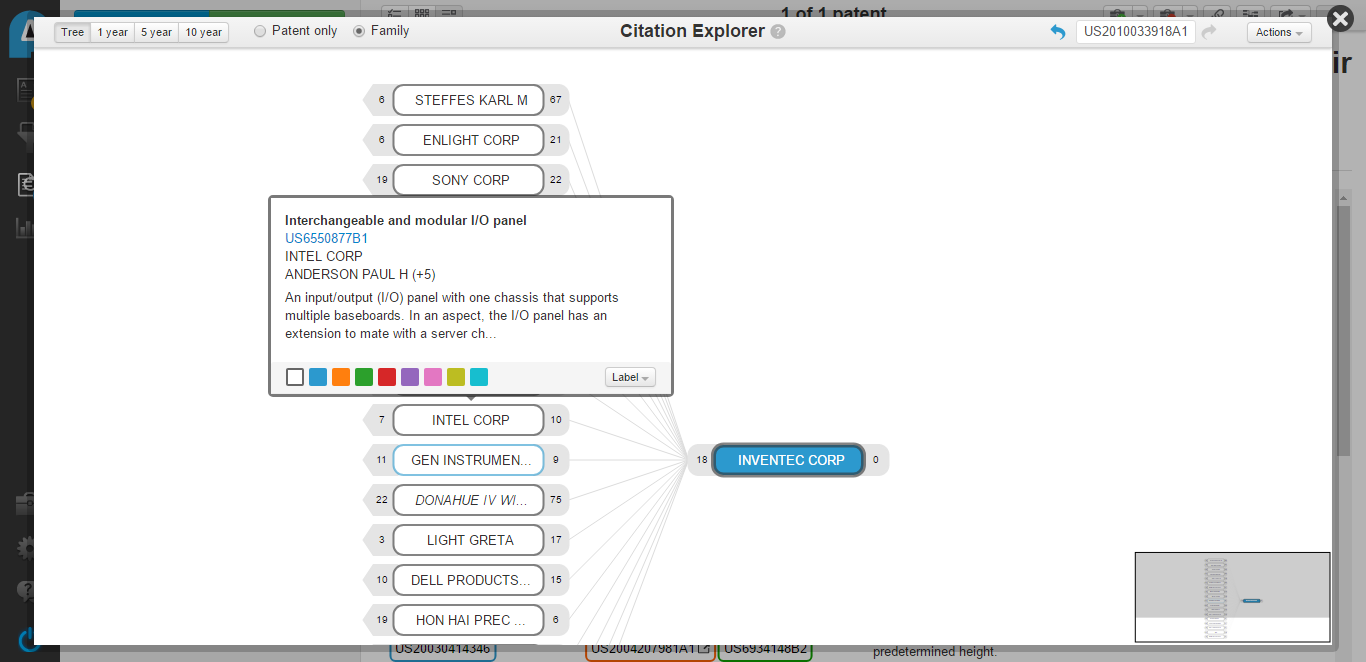


Further, you can add all the citation results you need in a 'briefcase' using the actions drop-down, and then navigate to the briefcase to add all the briefcase results into a new report.

After adding them to a new report, you can add further citations, filter through them (with dates or specific keywords, for example), and perform all available analysis.

Check the video below to see how to do this:


Getting all basic information about companies (players/actors) in a technology / field in few minutes - Patentinspiration tool review

How to identify key players (companies, startups, universities, and research institutes) in a technology area quickly?


As a part of my ongoing review of Patentinspiration tool by AULIVE, after being amazed by the 'find related terms' feature which allows one to find synonyms and related terms quite easily, I wanted to give everyone a glimpse of the vast array of features this tool has when it comes to analysis of key players or key actors in a technology field (both corporate players or companies and academia & research players)


Steps to get all key players active in a technology area in Patentinspiration


I started off with a technology area that I am interested in:


With just a click, I can access the players most actively filing patents on this area:


Check out this video on how to navigate and analyse key players and their patent filings:


Further, there are some very cool options for analyzing companies with respect to one or more parameters. Here is the company vs field of invention analysis


Company vs. Field of Invention Analysis - Patentinspiration


Apart from fields of invention, one can choose nouns, noun groups, verb groups, adjectives, etc. to map to players. See below a noun group to company mapping:


Company vs. Noun-group Mapping - Patentinspiration

You can see connections in terms of technology between key players by analyzing their patent filing CPC / IPC codes and /or citations.


Player Technology Linkage - Patentinspiration


Getting problems addressed and fields of invention from patent filings in a landscape automatically - Patentinspiration

In some study types and objectives, understanding what problems are being addressed and solved within a particular technology area is an important step.


Insights that can be drawn from problem-solution analysis in a patent landscape


1. What are the most common problems being addressed by a majority of active companies and universities in an area?
2. Which common problems have different proposed solutions?
3. Which common solutions can solve multiple problems?
4. Which problems are common to academia and research institutes as well as corporate players?

Now, of course, something that gives out good insights needs a detailed analysis. Although, for perfect detail, a manual analysis is necessary currently. Patentinspiration, the tool from AULIVE that I am currently reviewing, offers a nifty little tool for finding out problems disclosed in patents in a search result set.

See the video I made to know how to do this:


Check out the review on 'find related terms' feature offered by Patentinspiration - which lets you find synonyms and related words for conducting searches, and the various company search and analysis features from Patentinspiration.  

Jun 4, 2017

Automatically generate synonyms and related terms in patent searches - Formulating a patent keyword search strategy

While I was reviewing PatentInspiration tool from AULIVE, one of its features impressed me so much that I just couldn't wait for the review to complete, and I decided to post about it right away. The feature under discussion here is called 'Find related terms'.

Patent searching is a tricky business; Getting the right keywords, classes, company name variations, etc. are very important in creating the right search strategy.

There are many tools out there that offer some kind of keyword search support feature which either suggests keyword variations, lets you opt for stemming, or suggests synonyms, and PatentInspiration offers all these and more in the 'Find related terms' feature.


Feature to find related terms, synonyms and keyword variations for patent searches in Patentinspiration 


Here's how this works:

Access the 'Find related terms' link within a new report


Enter the keyword for which you need related terms in the dialog box that opens when you click on the 'Find related terms' link:


Choose the keywords that you feel are most relevant to the case you are working on (or even select all)


Add the selected ones to your search query:


====================================================================


Test - 'Find related terms' output for keyword 'Artificial intelligence' on Patentinspiration


When I ran a test for this feature using the keyword 'artificial intelligence', the tool suggested some very useful keyword variations to me such as machine learning, natural language understanding, speech recognition, text categorization, bayesian networks, neural networks, etc. It even gave me a very relevant keyword for my case - kohonen networks (which frankly I wasn't expecting from the tool).

'Artificial intelligence' synonyms by 'Find related terms' feature